Sunday, November 11, 2012

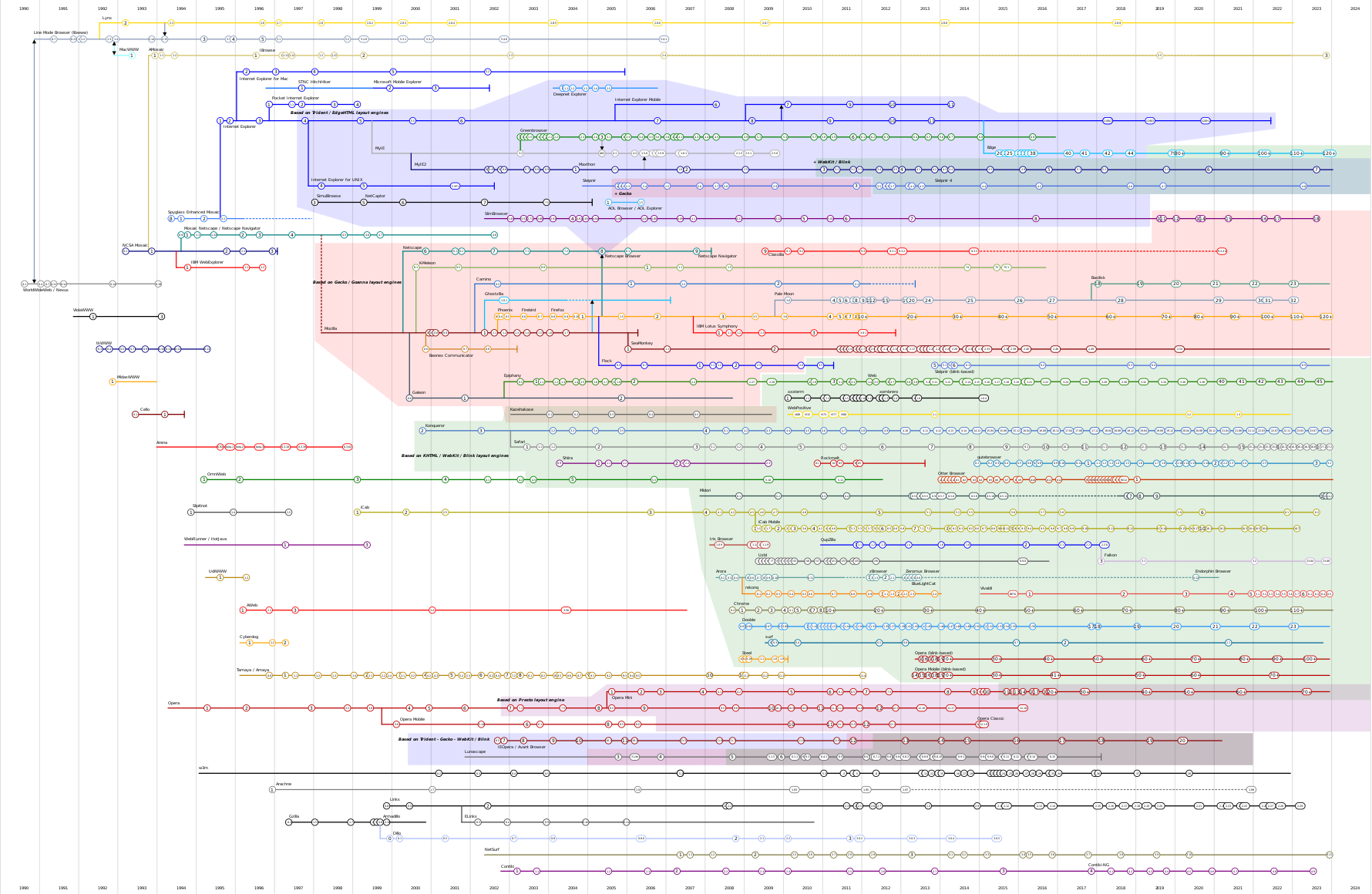
Web Browser and Javascript History

History of Web Browsers 

The Evolution of Web Technologies

The WorldWideWeb (www) was created in 1990 by Tim Bernards and Robert Cailliau at CERN when they first sucessfully tranmistted messages by the HTTP protocol.

The Protocol

The protocol for the web is HTTP where the web client requests information and the web server responds to that request.

The Server and Client Browser

The first web browser were of a monolithic design. In the mid 1990s modular designs were developed which allows us to talk about Scripting Engines, Rendering Engines and Document Object Models and the major components in a Web Browser design.

Web Servers are Apache, IIS, nginx, GWS. These are mostly modular design. Web servers typically handle requests and produce responses from databases.

The Scripting Engine

Javascript was created for Netscape Navigator2.0 beta in 1995 and was soon adopted by Mircrosoft for Internet Explorer 3.0 in 1996  ECMAScript became a formal specification in 1996.

The Document Model

Each browser has a model of the document created from the source HTML input. Using scripting the document may be manipulated by code within the browser. This is Document Object Model (DOM) - Versions: DOM Level 1, year 1998, DOM Level 2, late in year of 2000.

The Rendering Engine

The Rendering Engine is a module of a Web Browser that converts a DOM into a graphic image for display. The Major Rendering Engines are Trident - Internet Explorer; Gecko - Netscape, Firefox; WebKit - Chrome, Safari; Presto - Opera. 

The Problem

All the standards and implementations evolved roughly at the same time and many browser vendors did not follow the standards. The legacy is a quirky mess that drive web programmers nuts.

Adventures with Amber

Adventures with Amber


This post is called Adventures with Amber because I want to use Amber to interface with Javascript libraries and I have had some difficulties. I plan to make a series of blog posts about my attempts to use Amber, Javascript debugging and the Bug I found in the amber code, which I believe I have a patch for.

Overview:

I discovered amber a few months ago and believe it is a useful implementation of Smalltalk in Javascript development . After running the Class browser and testing a few of examples I believed that it was likely I could do useful work with amber. I proceeded to build a test project - Google Charts API in amber.

Amber Hello Example:

I set a goal of using Google Charts API because there is good example code. I proceeded in the following manner I consturcted an Amber hello world example from the amber Getting Started example. I got this example to work.

Google Chart Pie Example:

Next I constructed a Google Chart Pie Graph from the Pie Chart Example page. I got this example to work.

Merging the two Examples:

I have worked over several months on this project. Often I would find when changing the load order of the chart and amber examples that the script would "hang" or "bug" in an extension that worked with both pieces. As with most open source software their are bugs and the projects are not really ready for prime time.

Learn to Debug - Scratch the itch - Find a Bug.

In the past few days I have been concentrating on the integration of Google Charts into amber. I have learned how to use the Javascript debugger and I believe I have found an error in amber.js which causes all the problems.

My next blog post will describe the error.


Sunday, September 9, 2012

ToDoMVC

ToDoMVC is project that implements a simple Web App in multiple JavaScript web frameworks. I believe this is an admiral idea. The purpose is to let you the programmer to see how the different frameworks can be used to decide between the many available.

MVC is Model-View-Controller Pattern when an application is divided into a Model of the solution domain, a View or display of the model and the Controller that contains the logic to update the model. I associated MVC with Smalltalk-80 design and the Wikip article relates MVC back to Xerox-PARC and Smalltalk or the "momma of object programming."

Sunday, June 10, 2012

Setting up my Smalltalk environment

The Motivation

I have been using "One-Click" Smalltalk images for Squeak and Pharo and I want a better organized.

Throw away images


Mariano Martinez Peck has posted a method for image building that I want to try out. Mariano describes that he is constantly building images and that images only last him three days. In Smalltalk images are the execution environment and while it is possible to keep an image for a long time and work on it day after day the final results for a programmer is the archived source files, because with those a new image can always be built.

There is a deeper philosophy involved. The Monticello packages are the valuable product from the programmer. The image files are transient they are just runtime used for development and deployment. The programming value is in the code.

VMs and Images


At the highest level there are only two things to worry about virtual machines (VM) and images. The VM contains all the operating system dependent code, .exe and .dll files in the case of windows.

To startup an image with a VM in a batch file you would


%VM% %IMAGE%


Where %VM% is a path to the VM executable and %IMAGE% is the path to the .image file.

There are a couple of implicit assumptions which are that all the .dll files are contained in the folder with the vm.exe file. And the .changes and base directory of the smalltalk environment image file.

Monticello Cache problem


Monticello caching is useful if that cache applies for all images and that can be accomplished by the following code for each image. This is likely part of my image customization in my image building script.


MCCacheRepository default directory: 
  (FileDirectory on: '/home/enter your directory/package-cache/')

Directory Layout

I create a folder called Smalltalk it containes the folders Pharo, Squeak, VM and Cache.

Pharo contains image files for Pharo, Squeak contains image files for Squeak, VM contains folders with various VM configurations and Cache contains a Folder Montecello with the common cached packages.

Project images are created outside of the Smalltalk folder but refer within that folder as appropriate.


Saturday, May 19, 2012

Pharo 1.4

Over the period of time I was working towards the Apps For Energy submission I found that my main development environment Pharo had pushed our a new version 1.4. My project was being done in 1.3 and I did not want to be distracted by making version adjustments at that time so I ignored it. But today I gave it a try.

Here is my experience. I downloaded the One Click 1.4 and created loaded my Green Button App from the Montecello sources. It took quiet a while for Seaside to load and I have a Metacello problem in my Configuration where the work around is just to load the project a second time and run a few initialization methods. Most of that went smoothly. I should have set the deprecation handling to don't bother me because the none of the deprecated methods were from my code. There were deprecated methods from Zinc and from Seaside. When I ran seaside /status it raised a number of deprecation warnings around accessing information related to the VM, I fixed all these points and wrote out a package with those fixes.

It is now time to explore all the new additions and find our about the "Ring" code I have heard about but don't have a clue about. So maybe I will report on that in about a week.
Green Tech Grind has an overview of the Green Button Apps and I missed the submission deadline. I think it is unlikely that my entry would have been the energy killer app everyone is hoping for.

I reviewed about 12 of the apps and got bored fairly quickly. My concept was to display energy data in a more acessable format. Green Tech makes the criticism about the "shiny graph format" used by most of the entries. I agree that the plot format is largely a lazy display issue, a similar plot was included with the sample data on the Green Button Data page if click the view my data button on the button of the page you will soon see a  HighCharts graph of the data. These graphs are only compelling to engineer types like me.

What is needed is a display that communicates to the remainder of the electric bill paying population out there. I will present by design when I get my Green Button Entry finished Real Soon Now, in about a week perhaps next month. If you have Green Button Data you can go to http://greendemo.seasidehosting.st and upload it to the app. The app however needs a few fixes do you will need to hunt for your data in time to see the display.

In my next post I will go through the high level design of the app and how I arrived at that display method.

Friday, May 18, 2012

Deadline passed

I missed the deadline for the apps for energy contest.

This is the first time I have tried a thing like this. Since I am a lone coded I was doing all the work. My app was early alpha and I had basically finished the functional design at 9am this morning. I did a sprint to finish the last feature and really wasn't able to integrate the feature. With an hour left before the submission I got hung up on the producing the video a technical feature. Basically I had gotten the process to work four days ago but I did not document it well enough to reproduce it. So no matter what effort I put into the process I failed the submission because of the lack of technical skill.

What to do next?

I have the app posted on the web http://greendemo.seasidehosting.st I will consider finishing project in my "spare time". I will evaluate the other entries to see if my thoughts and ideas were used by someone else.

There are several things about doing this project in Seaside that need to be considered it a project like this is to be hosted at seasidehosting.st. The most important thing to know is that I could not find how to convert my Pharo image to a VM that was compatible with the VM on seasidehosting.st. I could get an image of seaside to that could run on seaside hosting but in my case the XML libraries on the squeak seaside image were not compatible with that of the Pharo version.  I ended up having to backport a series of routines to the squeak version. I got fairly good at writing the compatibility version. The real question is if seasidehosting.st has the mission of promoting seaside and seaside developed on Pharo it seems that seaside hosting is a largely abandoned wasteland abandoned seaside implementations.

The development period was 45 days which is quite short. I felt it was achievable to have a working prototype of this project in that period of time. I learned a lot of technical information about the project and implementation of Smalltalk prototypes. A working knowledge of CSS and Javascript.

I believe my display method has merit. I believe the Pharo development environment also has merit. I think we need to develop tools to port Smalltalk code to the browser javascript environment, since in many cases my Smalltalk code was merely writing javascript to the browser. The odd mixture of html, javascript and css on the browser with a powerful but complex system for the construction of web applications. Seaside in itself is a whole new way of writing html code at least in prototype fashion.